
Clinical Communication That Does Not Demand an Immediate Response.
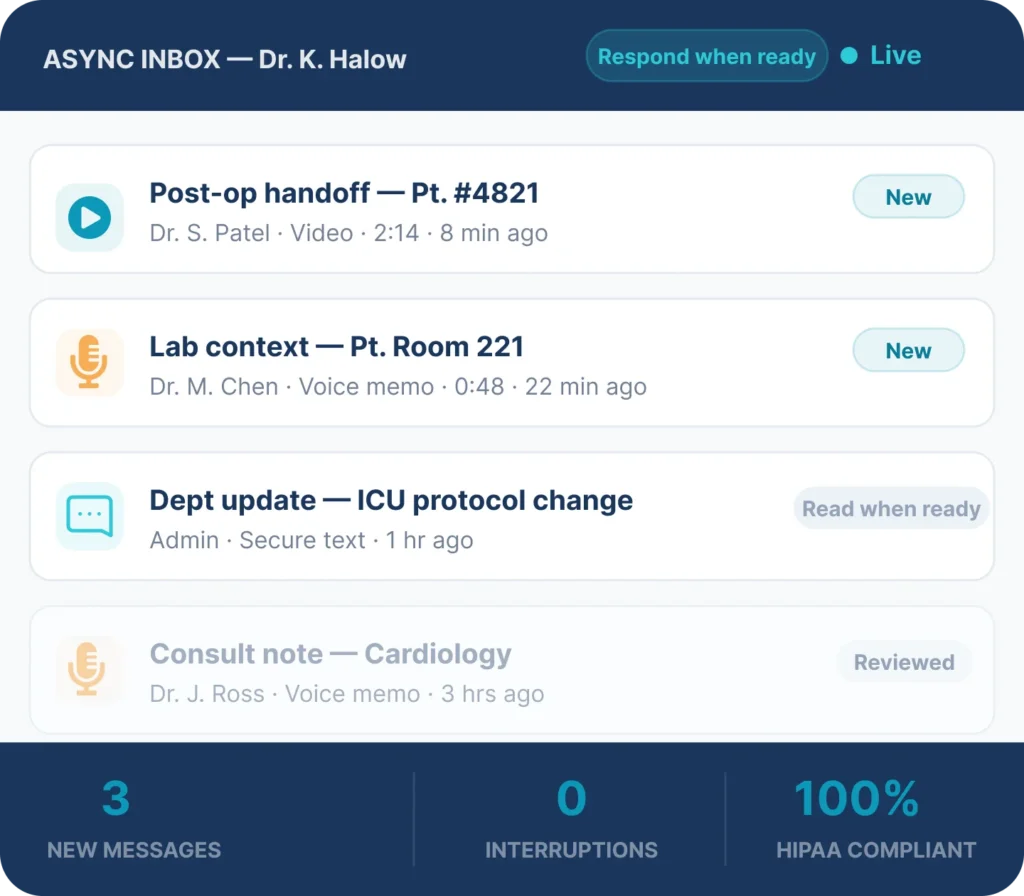
Store-and-Forward Video
Record a clinical update. The recipient watches it when they're free.
Voice Memos
Dictate clinical context in seconds. No typing, no interruption, full audit trail.
Secure Text Threads
Encrypted non-urgent messaging. Recipients respond when the encounter ends.
HIPAA-Compliant End-to-End
Every async message encrypted, logged, and BAA-covered from day one.
Most Clinical Messages Don't Need an Immediate Response.
Most Platforms Treat Them the Same Way.
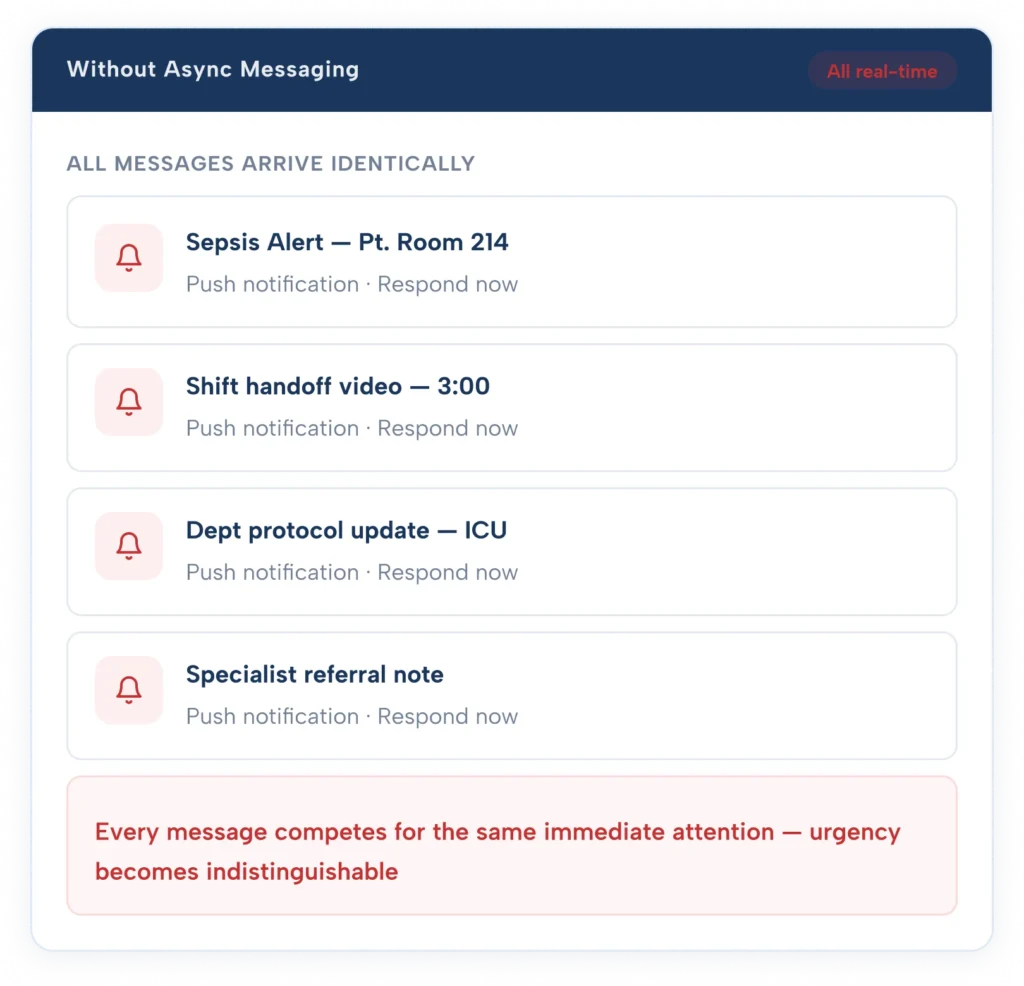
Today’s clinical communication tools have one delivery mode: real-time. A sepsis alert, a shift handoff video, a specialist’s referral note, and an ICU protocol update all hit the same notification channel. Every one of them says respond now, regardless of what the physician is doing or whether the situation actually requires it.
A physician mid-encounter can’t watch a handoff video. A physician in the middle of rounds can’t respond to a non-urgent referral note. When every message carries the same urgency signal, physicians start ignoring the channel entirely, including the messages that genuinely matter.
The problem is structural, not behavioral. A single real-time delivery channel can’t distinguish between a code blue and a care plan update. Asking physicians to selectively ignore certain notifications isn’t a fix. The fix is a dedicated asynchronous channel that matches delivery mode to message urgency at the platform level.
What ClinicianCore Asynchronous Clinical Messaging Does
ClinicianCore’s Practice HQ Asynchronous Messaging is the store-and-forward communication layer inside ClinicianCore. It sits between alert sources and the physician’s device, giving clinicians a structured channel for clinical communication that doesn’t require both parties to be available at the same time. Video, voice, and text messages are composed, encrypted, delivered to an inbox, and reviewed when the recipient has a moment. Nothing interrupts a patient encounter.
- Physicians record a video, dictate a voice note, or write a message between patient encounters, not during them
- Recipients get an inbox notification, not a push alert, and review it on their own schedule
- Async mode is selected at the point of composition, removing response pressure from the recipient before the message is even sent
- Every message is encrypted, timestamped, and tracked from send to read confirmation
- Works alongside Practice HQ Smart Routing: urgent alerts go real-time, everything else goes async
ClinicianCore Async Messaging Capability Explained
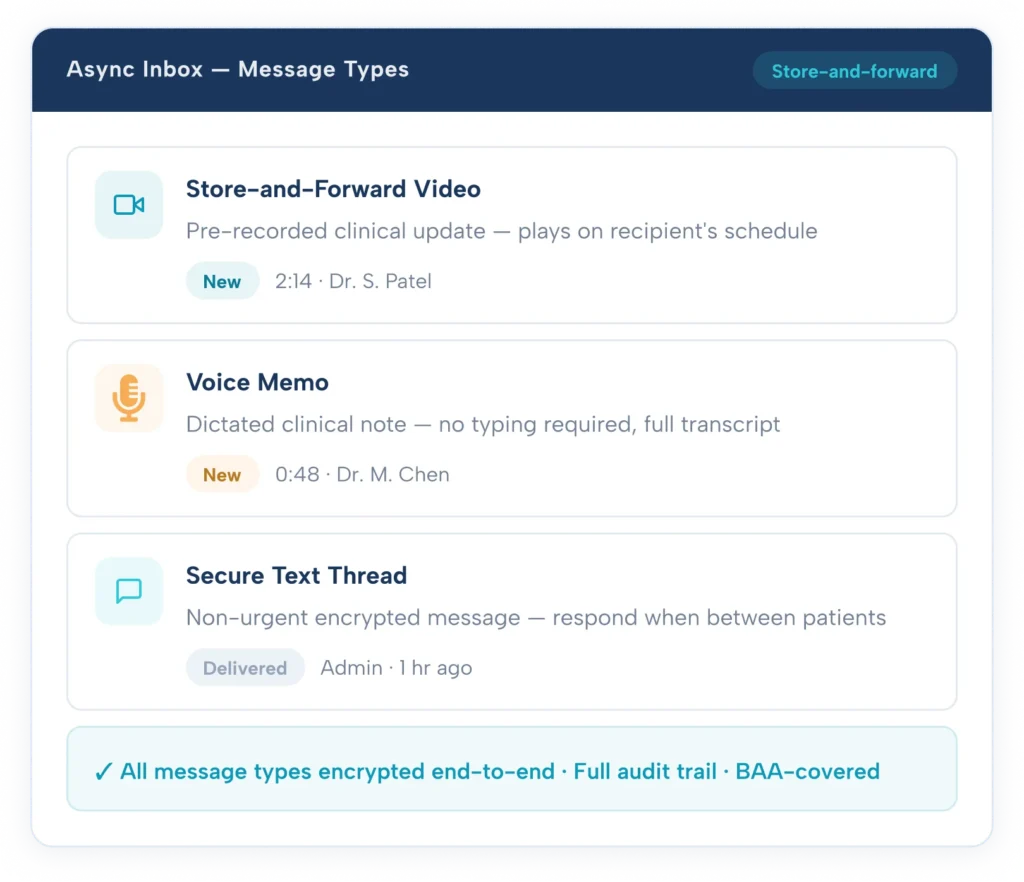
Three message formats, one secure platform. Here is precisely how each format works and when physicians use it.
Record a clinical video. The recipient watches it when they're ready.
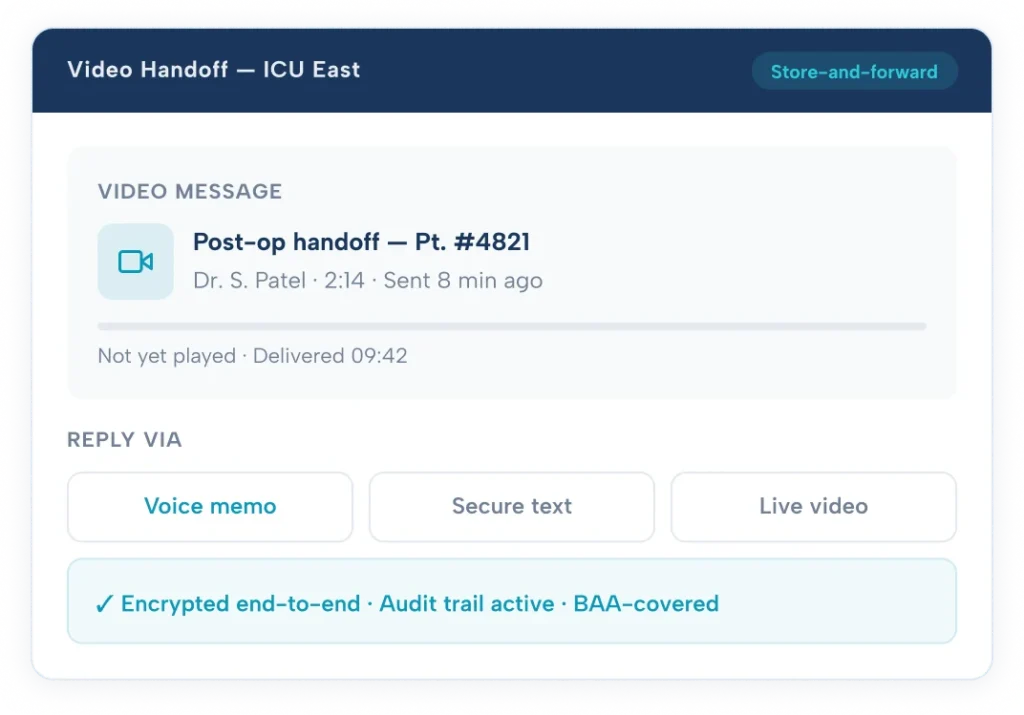
Store-and-forward video in Practice HQ is exactly what the name says. The sending physician opens the mobile app, records between patient encounters, and sends. The recording is encrypted immediately, stored on ClinicianCore’s HIPAA-compliant infrastructure, and delivered to the recipient’s async inbox. They watch it during a break, before rounds, or whenever they have two uninterrupted minutes. Neither physician’s workflow is touched.
This format works best for clinical handoffs, post-procedure summaries, care plan walkthroughs, and any clinical context that’s better shown than typed. It’s not a workaround. It’s a purpose-built channel.
- Record directly from Practice HQ mobile app on iOS or Android
- Video is encrypted at the moment of recording, never stored unencrypted
- Delivery is timestamped; read confirmation logs when the recipient plays the video
- Recipients can reply by voice memo, text, or escalate to live video if urgency shifts
- Full video retained in the audit log, retrievable by compliance officers
- Best fit: post-op handoffs, care plan updates, specialist-to-specialist clinical context
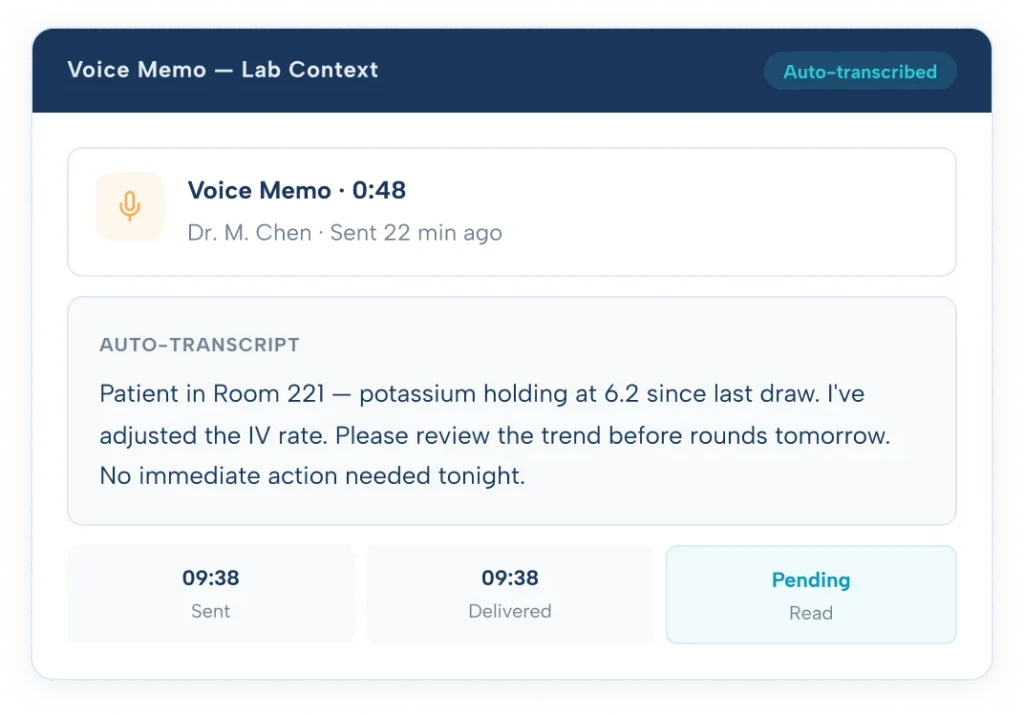
Dictate a clinical note in under a minute. No typing needed.
Practice HQ voice memos let physicians record a spoken clinical note from their phone and send it to any colleague on the platform. The recipient gets an audio file in their async inbox and listens when they’re between patients. No typing on either end. No phone call. No interruption to either physician’s day.
Every voice memo is automatically transcribed and stored alongside the audio in the audit log. Compliance teams get a searchable text record of every voice-based clinical communication, even after the audio has been archived.
- One-tap recording from Practice HQ mobile app. Hold to record, release to send.
- Automatic transcription stored alongside the audio file
- Both audio and transcript encrypted, separate from any consumer voice tool
- Audit trail captures sent, received, played, and reply timestamps
- Best fit: lab result context, clinical updates, non-urgent specialist notes, referral summaries
Clinical text that doesn't interrupt. Organized by patient, not by contact.
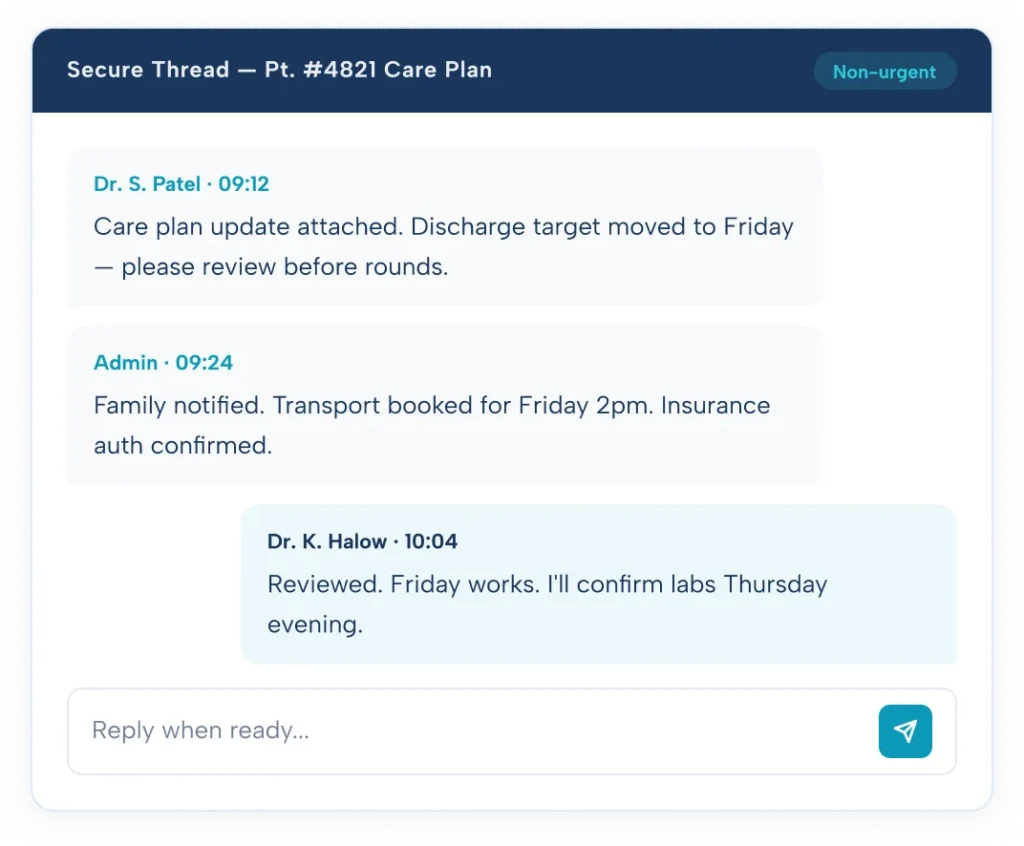
Practice HQ secure text threads are persistent, HIPAA-compliant message threads between physicians, care teams, and administrative staff. In async mode, messages don’t generate push notifications. They go to the recipient’s inbox and wait. Both sides communicate on their own time.
Threads are organized by patient, topic, or department, not by individual contact. Every message related to a specific care plan lives in one place, regardless of how many people contributed.
- Threaded by patient, care topic, or department, not by contact list
- No push notifications in async mode; inbox delivery only
- PHI-safe: encrypted end-to-end, nothing stored locally on the device
- Any thread can be escalated to live voice or video if the situation changes
- Read receipts and audit trail are tracked per message, not per thread
- Best fit: care plan updates, department announcements, referral coordination, administrative communication
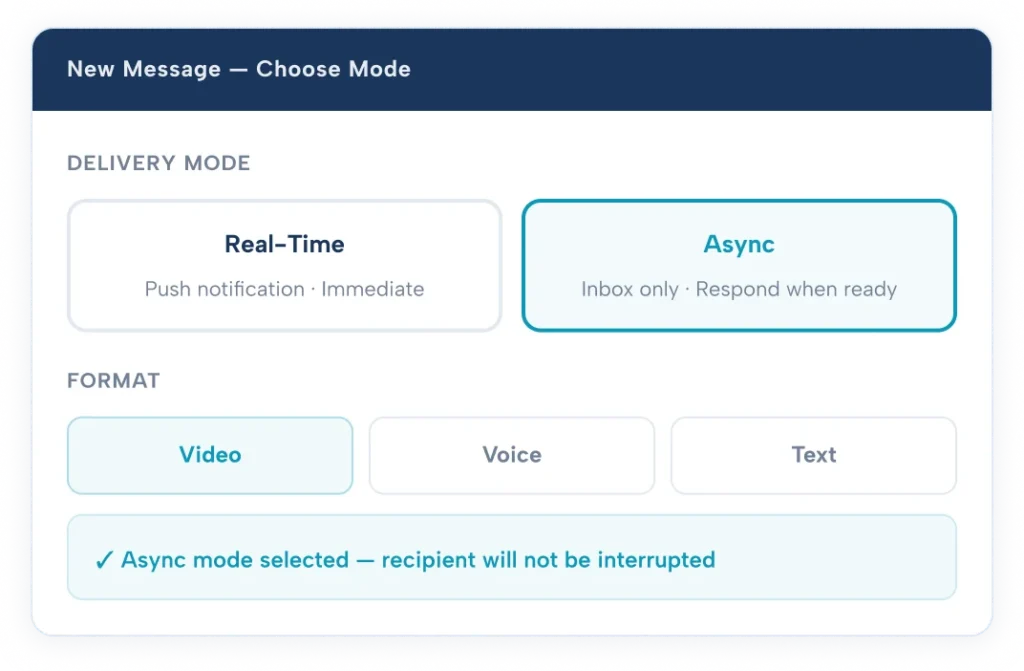
Urgent messages go real-time. Everything else goes async. One app, one decision.
Practice HQ Asynchronous Messaging doesn’t replace Practice HQ Smart Routing. They run together. When a physician composes a message in Practice HQ, they pick the mode: real-time for urgent clinical situations, async for everything else. Smart Routing handles urgency-scored delivery on the real-time side. Async Messaging handles store-and-forward delivery on the non-urgent side.
Both channels run inside the same ClinicianCore platform, under the same audit trail, from the same mobile interface. Physicians don’t switch apps. They choose a mode.
- Real-time mode: Critical and High tier messages, push notification, immediate delivery
- Async mode: Non-urgent communication, inbox delivery, respond when ready
- Both modes in one app with no tool-switching or separate login
- Sender picks the mode at compose; the platform delivers accordingly
- Escalate from async to real-time at any point if the situation changes
From Recording to Reviewed
Four steps. The sender records when they're ready. The recipient reviews when they're available. Nothing interrupts either end.
Message enters Practice HQ platform
In the ClinicianCore's Practice HQ mobile app platform, the physician records a video, dictates a voice memo, or composes a text thread message. Async mode is auto-selected at this step.
AI scores urgency before the message reaches any inbox
The moment the message is sent, two things happen simultaneously. ClinicianCore's AI reads the content and assigns an urgency classification, determining whether it routes asynchronously or escalates to real-time delivery. At the same time, the message is encrypted end-to-end and stored on HIPAA-compliant servers. The sending device retains no unencrypted copy. Both happen before any recipient device is reached.
Recipient role matched
A low-priority inbox notification reaches the recipient. No push alert. The message waits in their async inbox until they're between patients or have a scheduled review window.
Recipient reviews on their schedule and replies
The recipient plays the video, listens to the voice memo, or reads the thread when they're ready. Read confirmation is logged automatically. Replies follow the same async workflow, or the recipient can escalate to live voice or video if urgency changes.
When Physicians Use Practice HQ Async Messaging
Six specific clinical scenarios where async delivery is the right call, and why real-time would just get in the way.
Shift Handoff Video
The outgoing physician records a two-to-three minute video covering active patients, pending decisions, and overnight context. The incoming physician watches it before their first round. No phone tag, no interruption to either shift.
Lab Result Context
The ordering physician sees a lab result and records a 30–60 second voice memo for the covering physician: what it means, what to watch, whether anything needs to happen before morning rounds.
Non-Urgent Specialist Note
A specialist reviewing a referral adds a text thread note with their preliminary assessment and a request for additional imaging, without calling the referring physician mid-clinic. The response comes when the patient list clears.
Department Protocol Update
A department head distributes an updated care protocol to all ICU physicians via a text thread. Physicians read and acknowledge it during their next review window. No patient encounter is interrupted.
Referral Coordination
The referring physician sends a video overview of the patient's history directly to the specialist before the consultation. The specialist arrives with full clinical context already on record.
Post-Procedure Update
The surgeon records a brief post-operative summary for the patient's primary care physician: what was done, recovery notes, follow-up plan. The PCP reviews before the patient's discharge call.
Built on ClinicianCore's Secure Communication Infrastructure
Practice HQ Async Messaging shares the same encrypted infrastructure, audit layer, and administrative console as Practice HQ Smart Routing, ConsultCore, and Trusted Entity. All part of a secure, HIPAA-compliant unified clinical communication platform built exclusively for physicians.
Encrypted in Transit and at Rest
Every video, voice memo, and text message is encrypted in transit and at rest. Nothing is stored unencrypted on the device or on ClinicianCore servers.
Full Audit Trail
Every async message generates four audit events: composed, sent, delivered, and read. Voice memo transcripts are stored alongside the audio. Compliance officers can retrieve any message record through Practice HQ audit log.
BAA at Onboarding
A Business Associate Agreement is executed as a standard onboarding step with every covered entity. Not an optional add-on. It satisfies the mandatory contractual requirement under 45 CFR Section 164.308.
Mobile-Native on iOS and Android
Video recording, voice memo dictation, and text thread composition all run natively in Practice HQ mobile app. No browser required. No third-party recording tool. No consumer app anywhere in the workflow.
No EHR Modification Required
Async Messaging runs above the EHR. Lab results, discharge summaries, and clinical data stay in the EHR. ClinicianCore carries the communication. No EHR workflow changes, no vendor coordination needed.
Escalation at Any Point
Any async conversation can be escalated to a real-time voice call, live video consult, or Practice HQ Smart Routing alert if the clinical situation changes mid-conversation. One tap, no app switching.
Questions About Practice HQ Asynchronous Clinical Messaging
What is asynchronous clinical messaging?
Asynchronous clinical messaging is a store-and-forward communication model where the sender records or composes a clinical message, video, voice, or text, and the recipient reviews and responds when they’re available. Neither party needs to be present at the same time. ClinicianCore Practice HQ delivers asynchronous messaging as a purpose-built, HIPAA-compliant platform feature, not a consumer workaround.
When should physicians use async messaging instead of real-time communication?
Use async when the communication doesn’t need an immediate response and when interrupting the recipient mid-encounter would do more harm than good. Shift handoffs, lab result context, specialist notes, referral coordination, and department announcements are all good fits for async delivery. Sepsis alerts, code blue notifications, and critical lab values belong on the real-time channel through Practice HQ Smart Routing.
Is Practice HQ async messaging HIPAA compliant?
Yes. Every message sent through Practice HQ Asynchronous Messaging, whether video, voice memo, or text, is encrypted end-to-end under 45 CFR Part 164 standards. Nothing is stored unencrypted at any point in transit or at rest. A Business Associate Agreement is executed with every covered entity during onboarding under 45 CFR Section 164.308.
Can Practice HQ async messaging integrate with our existing EHR?
Practice HQ Asynchronous Messaging runs above the EHR layer and requires no changes to existing EHR configuration, workflows, or user permissions. Physicians can reference patient context from the EHR in their async messages, but the message travels through ClinicianCore’s infrastructure, not the EHR’s messaging system. No EHR vendor involvement is needed for implementation.
How does async messaging reduce physician interruption during patient care?
Practice HQ Async Messaging reduces physician interruption by separating communication that needs an immediate response from communication that doesn’t, and routing each through the right channel. Async messages don’t generate push notifications. They go to the inbox and wait. Physicians review them between encounters, during a scheduled review window, or whenever they’re not mid-appointment.
Can’t find your questions?
See Practice HQ Async Messaging in a Live Demo
We’ll walk through the store-and-forward workflow, the async inbox, and how it fits alongside Practice HQ Smart Routing, built around how your organization actually communicates.