
The Right Alert Reaches the Right Physician Every Time
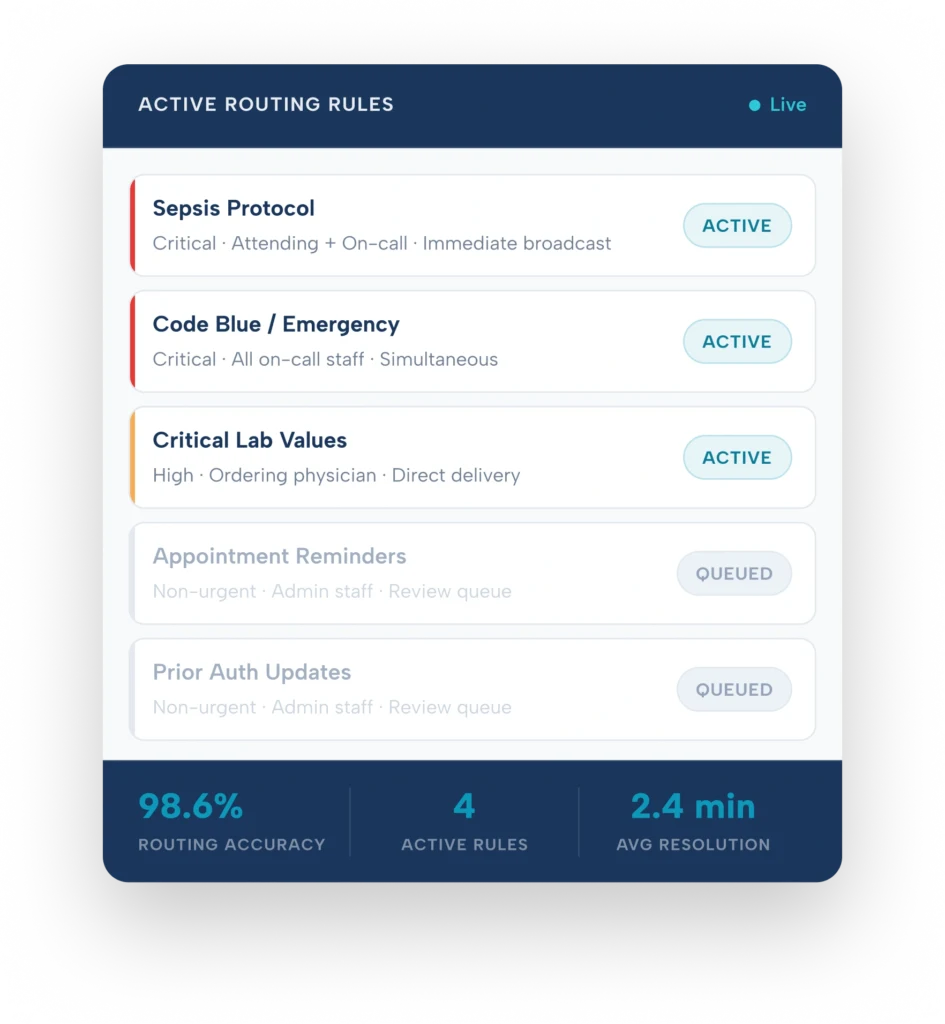
Real-Time Urgency Scoring
Every message scored at platform entry — before any device is reached
Role-Based Delivery
Routes to the accountable clinician — not a static recipient list
On-Call Integration
Live on-call status determines who receives what and when
HIPAA-Compliant Encryption
Every routed message encrypted in transit and at rest — BAA included
How ClinicianCore AI Smart Routing Works
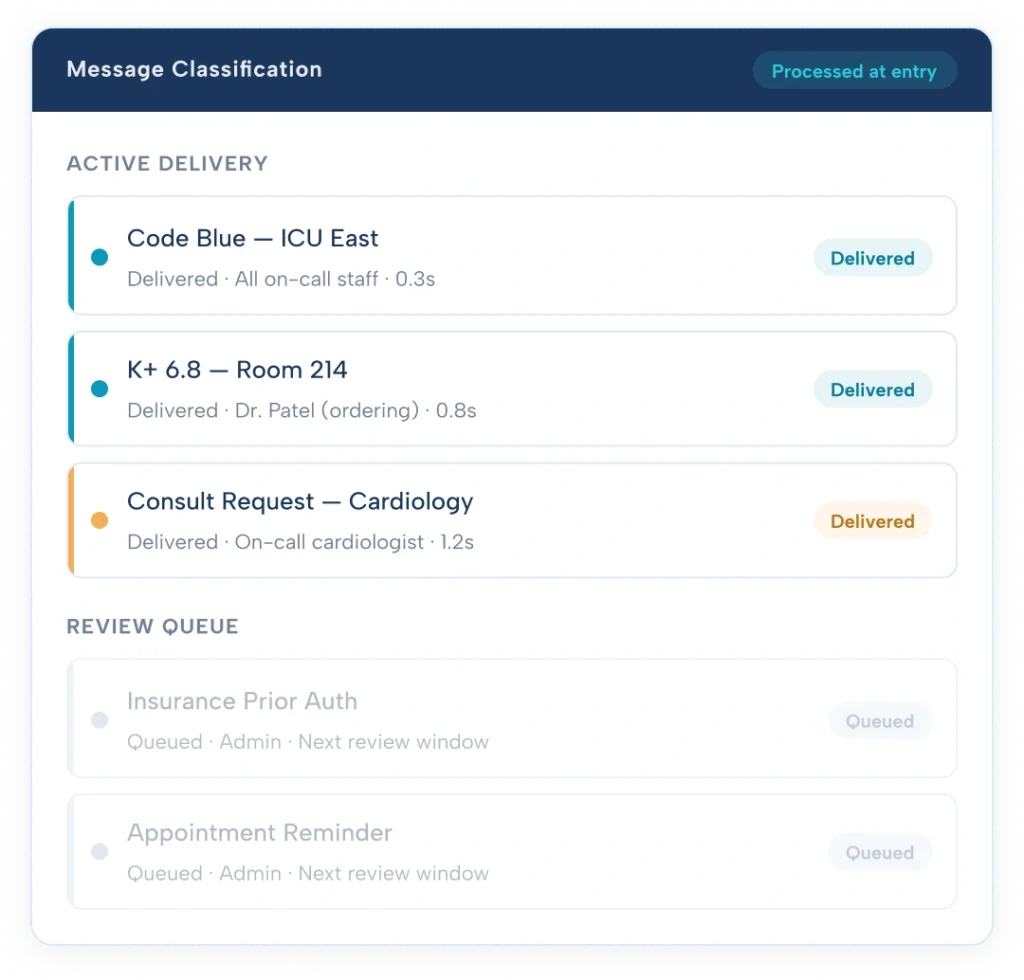
ClinicianCore Smart Routing is the notification intelligence layer of ClinicianCore. It sits between your organization’s alert sources — EHR, lab systems, scheduling tools — and the physician’s device. Every message is evaluated, prioritized, and routed before it arrives. Physicians see only what requires their immediate attention.
- Assigns a clinical urgency score to every incoming message at the moment it enters the platform
- Matches each scored message to the correct recipient based on their current role and coverage status
- Delivers critical alerts immediately — routes non-urgent messages to a structured review queue
- Adjusts delivery paths automatically when on-call status changes — no manual intervention
- Logs every routing decision with a full timestamp and attribution record for compliance
The Problem
The Intelligence Behind ClinicianCore Smart Routing
Four steps from alert entry to physician delivery all automated, all HIPAA-compliant.
Every message is scored before delivery
The routing engine assigns a clinical priority score the moment each message enters the platform based on content classification, severity indicators, and the organization's configured urgency thresholds. Critical alerts route immediately.
Routes to the accountable clinician
Scored messages are matched to the correct recipient role attending physician, covering resident, specialist, or on-call staff based on current accountability, not a static recipient list. Coverage transitions update routing automatically.
On-call status determines delivery and escalation
Physicians off-call receive no alerts intended for on-call coverage. Escalation paths activate automatically when primary recipients are unavailable no manual handoffs, no coverage gaps.
Critical alerts to device. Non-urgent to queue.
High-urgency alerts reach the physician's mobile device immediately. Non-urgent messages accumulate in a review panel for access during clinical downtime. Active notification space stays reserved for what requires an immediate response.
Physician burnout reduction platform →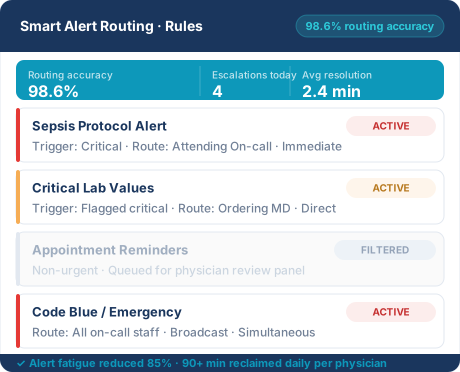
AI Smart Routing Decision Explained
HCO Smart Routing operates across five interlocking systems. Here is precisely what each one does.
AI-Powered Clinical Urgency Classification
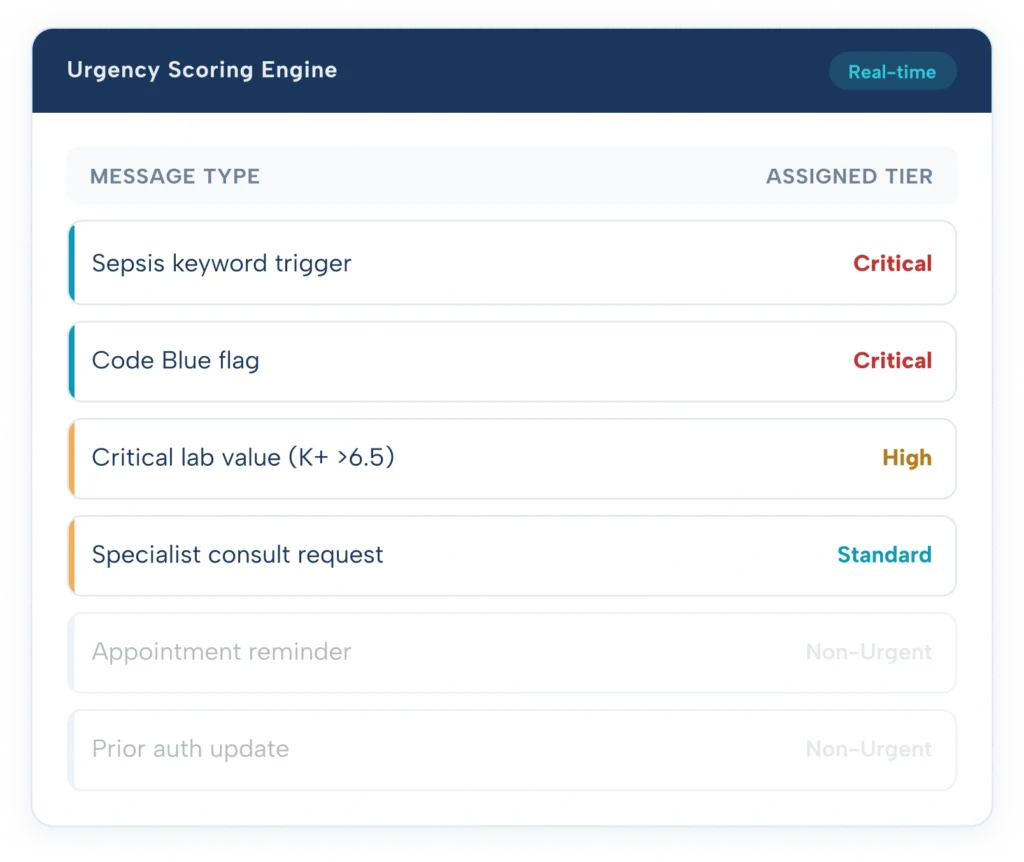
Every message entering the HCO platform is evaluated against a configurable urgency scoring model before any delivery decision is made. The scoring engine reads message content, alert type, source system flags, and keyword triggers — then assigns a priority tier: Critical, High, Standard, or Non-Urgent.
Medical directors configure the scoring thresholds through a no- code rule builder. Sepsis keywords can trigger Critical routing. A potassium value above a set threshold triggers High. A routine scheduling reminder scores Non-Urgent automatically. No engineering support required to adjust the model.
- Four urgency tiers: Critical, High, Standard, Non-Urgent
- Keyword-based triggers configurable per department and care setting
- Source system flags from EHR, lab, and scheduling integrations respected
- Scoring happens in under one second at message entry — before any device is reached
- Every score is logged with timestamp, trigger rule, and assigned tier
Routes to the Role, Not the Individual
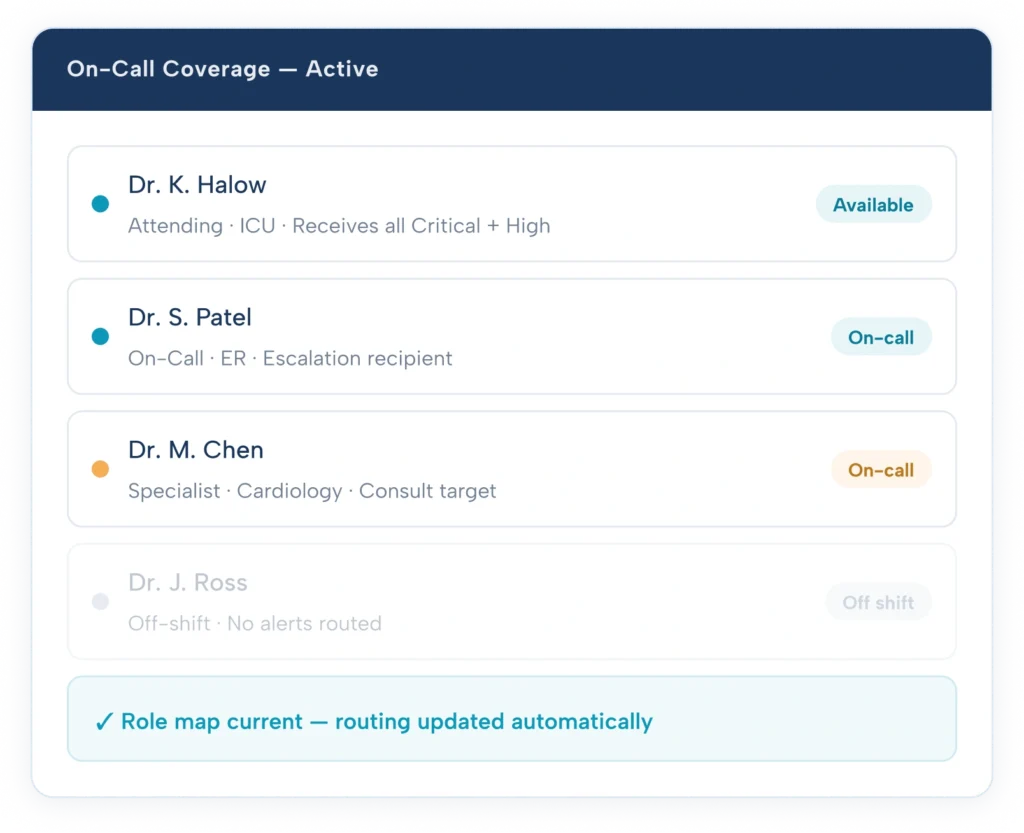
Once a message is scored, HCO matches it to the correct recipient role — not a named individual. The platform references the organization’s current role map: who is the attending, who is covering, which specialist is on call for this department. Delivery targets the role that holds current accountability.
When a physician rotates off a service or a resident takes over a patient panel, routing adjusts automatically. There is no static recipient list to manually update. Coverage transitions do not require any physician or administrator action to take effect in the routing engine.
- Role map reflects current accountability — attending, covering, on-call, or specialist
- Coverage transitions update routing automatically — no manual list management
- Multi-role delivery for Critical tier — attending and on-call coverage notified simultaneously
- Department-level role segmentation — ICU, ER, General, Surgical, Pediatric
- Role assignments visible in the HCO administrator dashboard with full edit access
Routing That Knows Who Is Actually Available
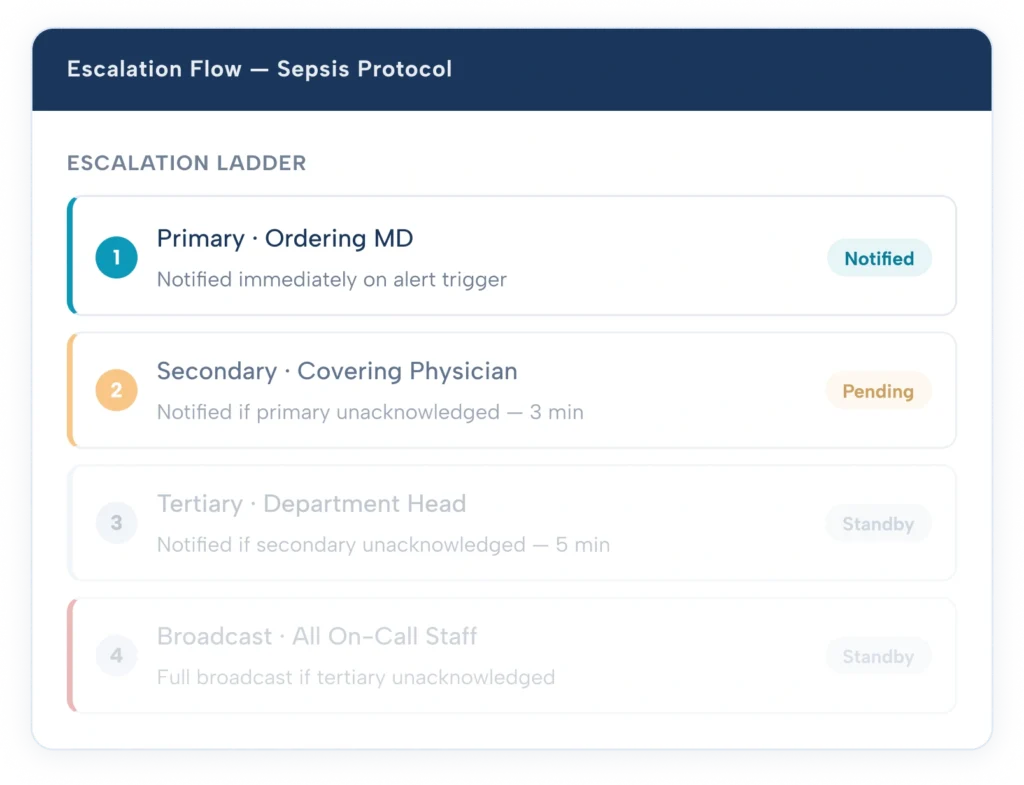
HCO integrates directly with the organization’s on-call schedule. Routing decisions are made against live on-call status — not against a role title that may no longer reflect who is covering. A physician listed as attending but currently off-call does not receive alerts intended for active coverage.
On-call schedules are imported and updated through the HCO administrator interface. Changes to on-call assignments take effect in the routing engine in real time. No physician needs to change a setting on their device or notify the system of a handoff.
- Live on-call status determines delivery — not the role title alone
- Schedule import from existing on-call management tools
- Real-time updates — schedule changes reflected immediately in routing
- Automatic escalation when the primary on-call recipient is unreachable
- No physician device action required on handoff — routing adjusts at platform level
Non-Urgent Messages Do Not Interrupt Clinical Work
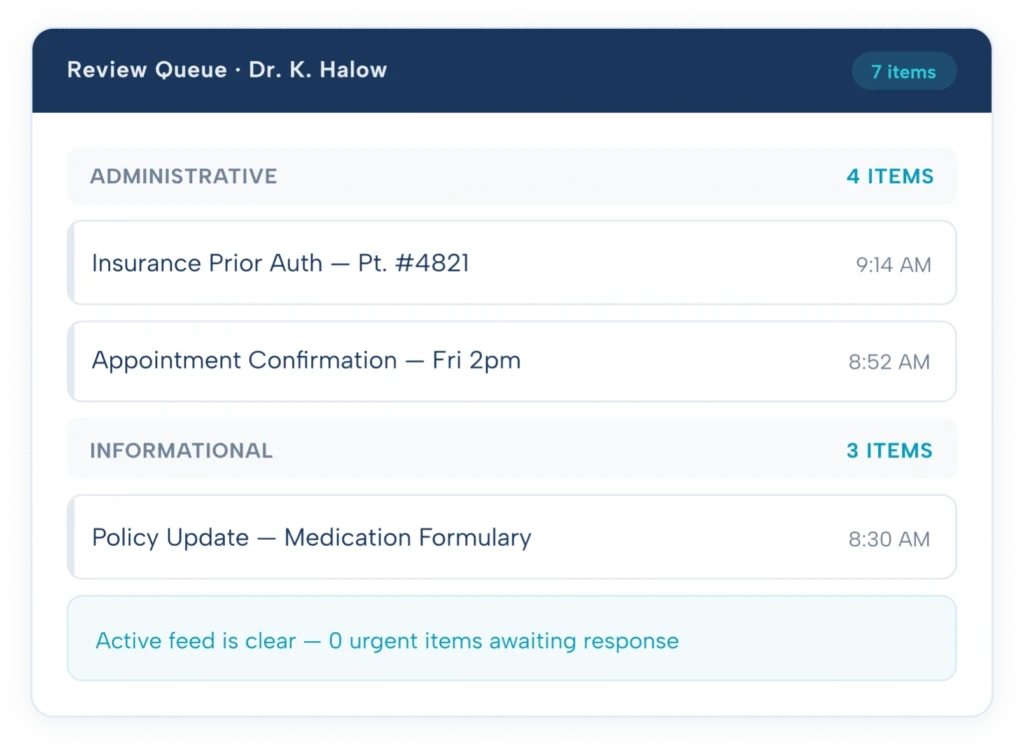
Messages scoring Standard or Non-Urgent do not reach the physician’s active notification feed. They accumulate in a structured review queue — accessible during clinical downtime, organized by time received, and grouped by message type. The active notification space is reserved exclusively for messages that require immediate action.
Physicians access their review queue on demand. Each item retains its full context — source, timestamp, sender, and original content. Nothing is discarded. Nothing goes unseen. It is simply delivered at a time that does not interrupt patient care.
- Review queue accessible at any time from the HCO mobile interface
- Messages grouped by type: administrative, informational, scheduling, referral
- Full message context retained — no information lost in queuing
- Queue cleared on review — no persistent notification badge accumulation
- Physicians can escalate any queued item to active delivery if priority changes
Medical Directors Configure Routing. No IT Required.
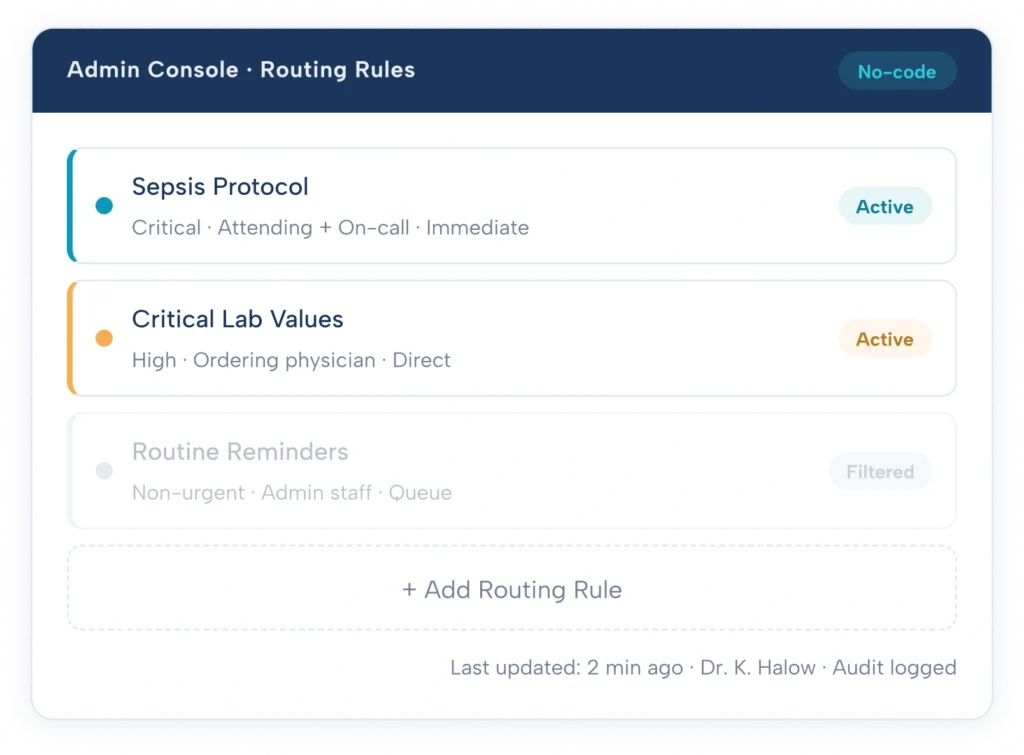
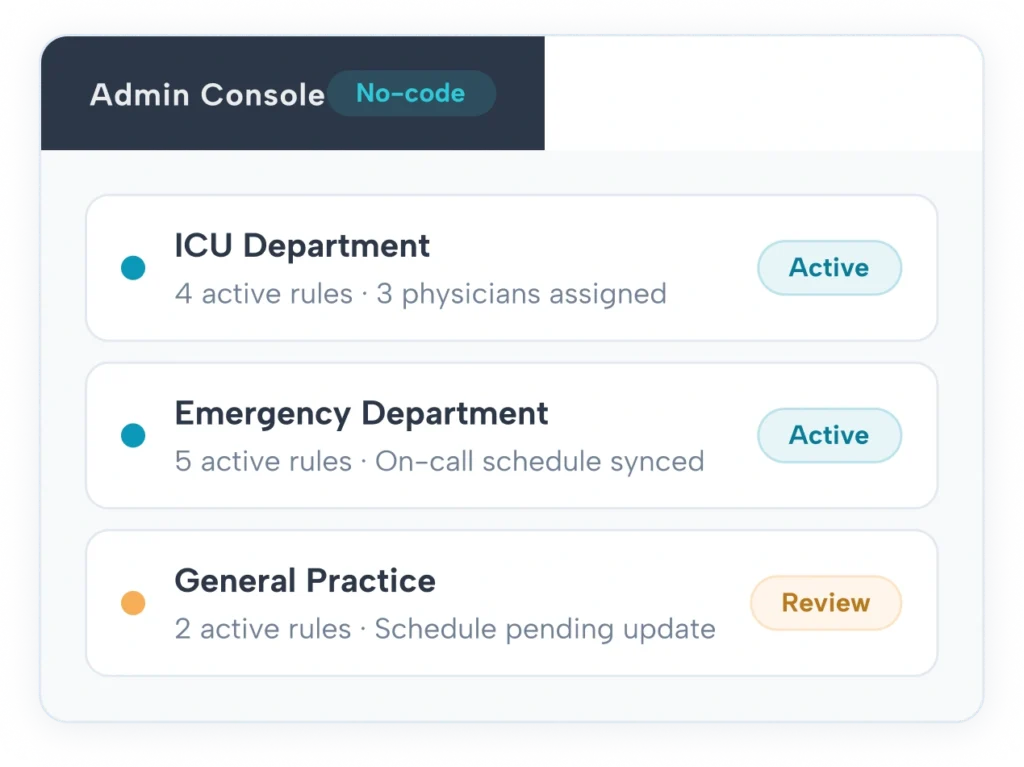
Every routing rule, urgency threshold, role assignment, and escalation path in HCO is configurable through a no-code administrative console. Medical directors and practice administrators have full control over the routing model — without submitting IT tickets, waiting for vendor implementation cycles, or engaging engineering resources.
Changes take effect immediately after saving. A medical director can adjust a sepsis protocol trigger, reassign an on-call escalation path, or add a new department filter in the same shift without waiting for system changes to propagate. Every configuration change is timestamped, attributed, and stored in the audit log.
- Point-and-click rule builder — no code, no SQL, no vendor involvement
- Same-day configuration for standard routing protocols
- Full audit log: every change timestamped and attributed to a named administrator
- Department-level access controls — administrators manage their own department rules
- Rule testing mode — preview routing behavior before activating a new rule live
Measurable Results from Smart Alert Routing
Three categories of documented outcome from organizations using HCO smart routing.
90+ min
Clinical attention reclaimed daily
Physicians who no longer triage equal-urgency notification streams recover 90+ minutes of clinical attention per day time that returns to direct patient care, documentation, and clinical decision-making.
85%
Alert dismissal behavior eliminated
When non-urgent messages no longer interrupt the active clinical workflow, physicians stop developing the alert dismissal patterns documented by the Joint Commission. Critical notifications are seen and acted on.
Same day
Routing configuration — no IT ticket
Medical directors configure routing rules directly through HCO’s administrative interface. Organizations report same-day configuration for standard routing protocols, with changes active immediately after saving.
From Alert Entry to Physician Delivery
Four steps — all automated, all happening before a single device receives a notification.
Message enters HCO platform
A care team member, nurse, specialist, or administrator sends a message through HCO to a colleague. The platform receives it before any delivery decision is made.
Urgency tier assigned automatically
HCO's AI reads the message and assigns a priority tier Critical, High, Standard, or Non-Urgent based on content, keywords, and the thresholds your medical director has configured. The sender does not need to manually flag urgency.
Correct recipient identified
The scored message is matched to the right person based on their current role, department, and on-call status. If the intended recipient is unavailable, the escalation path activates automatically.
Delivered or queued
Critical and High tier messages reach the recipient's device immediately. Standard and Non-Urgent messages go to the structured review queue. Every routing decision is logged.
How Each Role Uses HCO Smart Routing
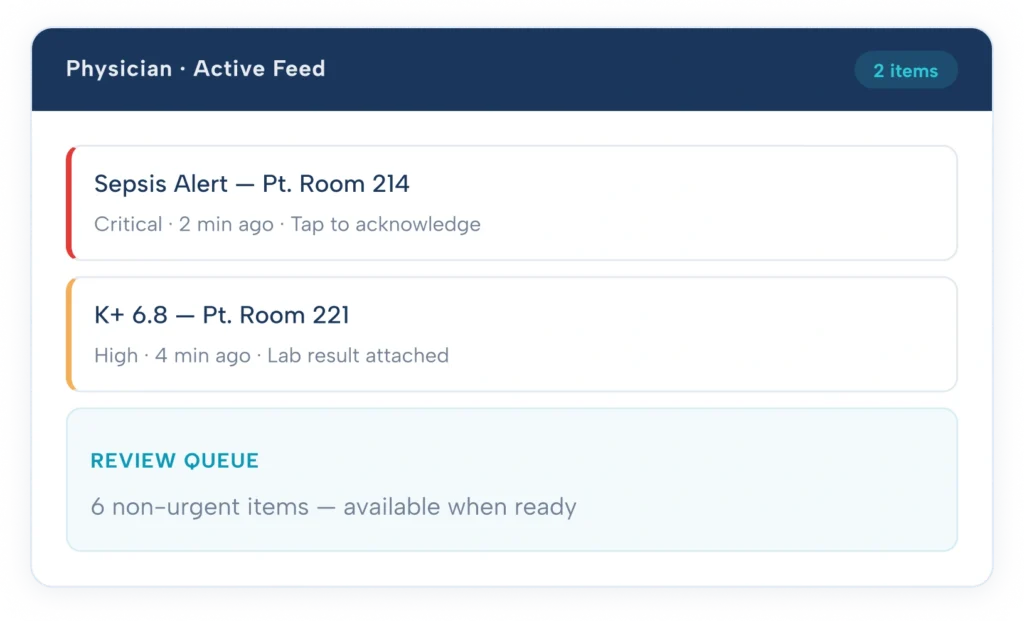
Your active feed contains only what requires your attention right now
HCO removes the triage burden from the physician entirely. The scoring and routing engine handles classification before any message reaches the device. Physicians open their notification feed and see critical items — nothing else competes for attention in that space.
- Active notification feed – Critical and High tier only. No noise.
- Review queue – Non-urgent items available on demand, never interrupting.
- Escalation visibility – When a message escalates to you, you see the full escalation context.
- On-call handoff – When you go off-call, routing adjusts automatically. No action needed.
Configure every routing rule without involving IT or engineering
Practice administrators have full access to the HCO routing configuration interface. Role assignments, department filters, and on-call schedule imports are all managed from a single administrative console. Changes are immediate — no support ticket, no implementation waiting period.
- Role map management –Assign and update physician roles across departments.
- On-call schedule import – Sync schedules and set coverage windows.
- Routing rule builder – Add, edit, and deactivate rules with no code.
- Audit access – Full log of every routing decision and configuration change.
Define the clinical urgency thresholds that govern your organization
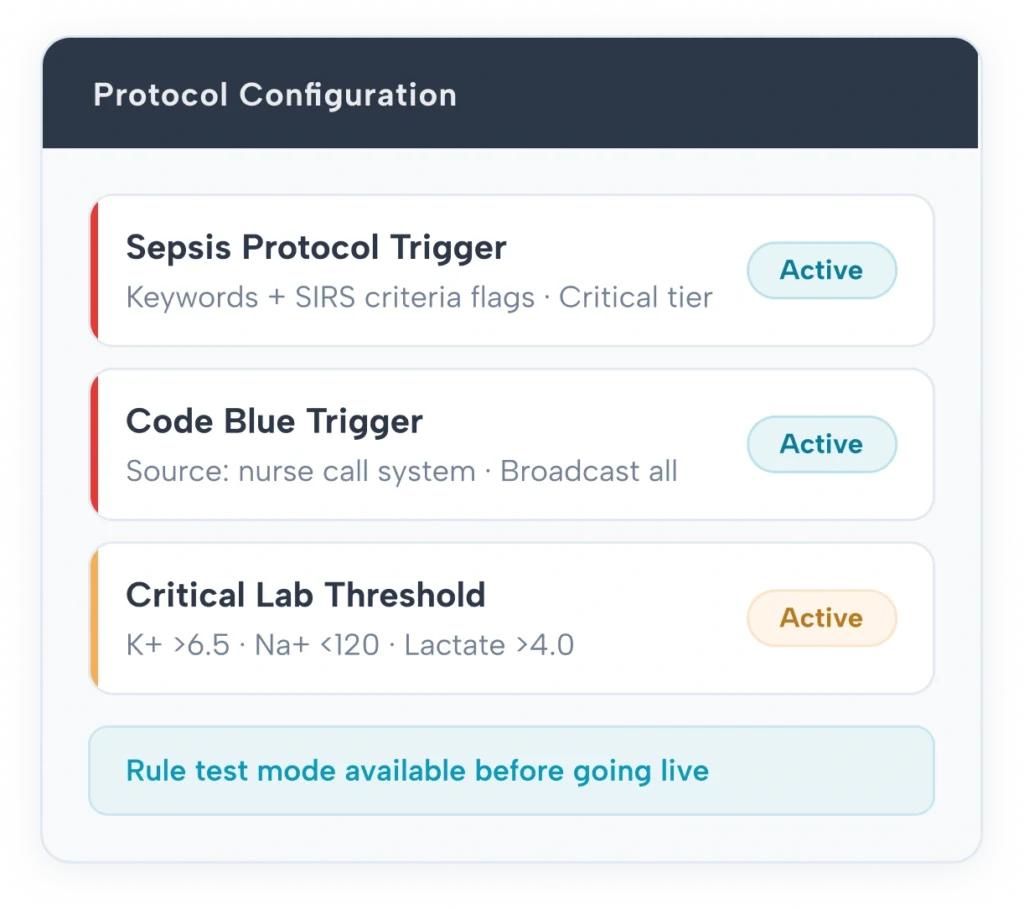
Medical directors own the clinical logic of the routing model. Urgency thresholds, protocol triggers, escalation timers, and multi-role broadcast rules are all set by the clinical leadership — not by a vendor or an IT team. The routing engine reflects the organization’s clinical judgment.
- Urgency threshold control –Define exactly what constitutes Critical, High, and Standard for each department.
- Protocol-based triggers – Sepsis, Code Blue, and custom protocols map to routing rules directly.
- Escalation timer settings – Set acknowledgement windows per tier and per protocol.
- Rule testing mode – Preview routing behavior before activating any new rule.
Full audit trail, HIPAA-compliant infrastructure, EHR integration layer
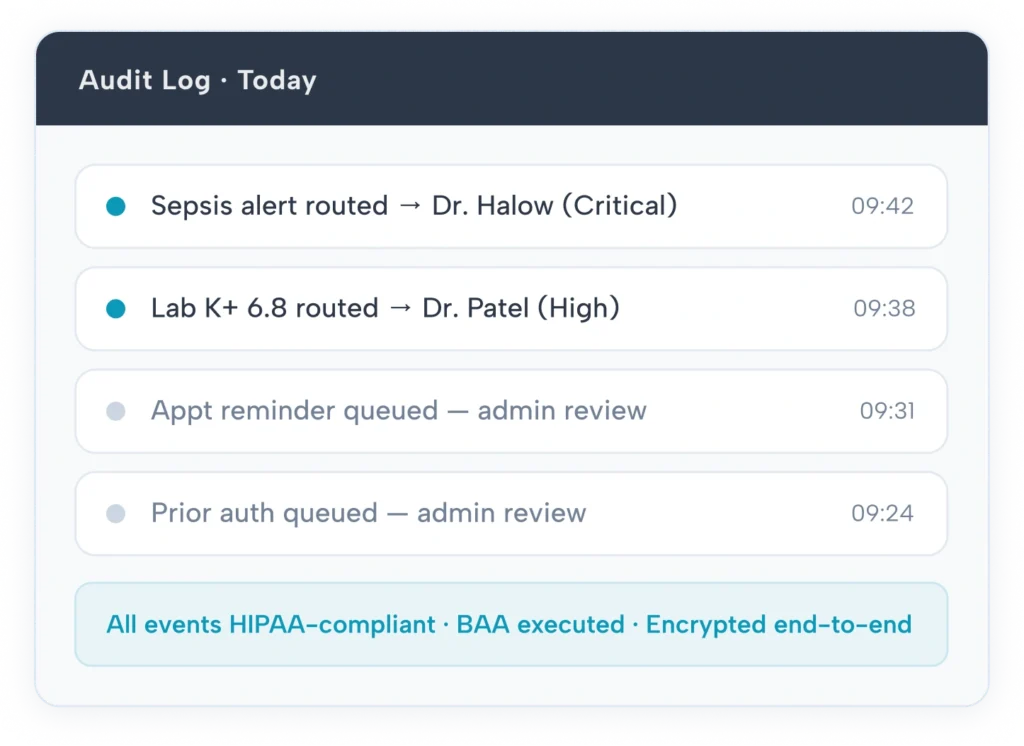
Every routing decision is logged with a complete record: message source, assigned urgency tier, recipient role, delivery timestamp, and acknowledgement status. IT and compliance teams have read access to the full audit log at any time. No data leaves the platform unencrypted.
- Full audit log – Every routing event logged with source, tier, recipient, and timestamp.
- BAA provided – Business Associate Agreement executed at onboarding.
- Encryption – All messages encrypted in transit and at rest under 45 CFR Part 164.
- EHR integration – Routing layer sits above existing EHR — no EHR modification required.
- Role-based access controls – Granular permissions per clinician type and department.
Built on ClinicianCore's Secure Communication Infrastructure
HCO Smart Routing is one module within ClinicianCore's unified platform. Every message routed through HCO shares the same encrypted infrastructure as HCC, HCX, and Physician Lounge
Encrypted in Transit and at Rest
Every clinical message is encrypted in transit and at rest under 45 CFR Part 164. PHI never passes through an unencrypted channel at any point in the routing process.
Tamper-Resistant Audit Trail
Every routing decision, configuration change, acknowledgement, and escalation event is written to an immutable audit log. Available to compliance officers at any time with full timestamp and attribution.
EHR Integration Layer
HCO sits above existing EHR systems — no EHR modification required. Alert data from Epic, Cerner, and other systems feeds into the routing engine without changing EHR configuration or workflows.
Mobile-First Delivery
iOS and Android native applications. Push notifications for Critical and High tier. In- app review queue for Standard and Non- Urgent. No web-only limitation — fully functional offline-capable mobile interface.
Role-Based Access Controls
Granular permissions per clinician type, department, and administrative function. Physicians see only their relevant routing feed. Administrators access only their configured scope. Compliance officers have read-only audit access.
BAA at Onboarding
Business Associate Agreement executed with every covered entity and business associate as a standard onboarding step. No additional legal negotiation. No separate compliance engagement required.
Questions About HCO Smart Routing
What is the difference between HCO Smart Routing and a standard EHR notification system?
EHR notification systems deliver every alert at equal urgency — the system generates the notification and routes it to whoever is listed in the patient record. HCO sits as a separate intelligence layer above the EHR. It receives the alert from the EHR, applies urgency scoring and role-based routing logic configured by your medical director, and then decides whether to deliver it immediately, route it to a different recipient, or queue it for later review. The EHR generates alerts. HCO decides what happens to them next.
Does implementing HCO Smart Routing require changes to our existing EHR?
No EHR changes are required. HCO integrates with major EHR platforms as an overlay layer — alert data flows from the EHR into HCO’s routing engine without any modification to EHR configuration, workflows, or user roles. The EHR continues operating exactly as it does today. HCO processes the outbound alert stream and manages delivery from there. EHR integration is configured during the ClinicianCore onboarding process and does not require your EHR vendor’s involvement.
Who configures the routing rules — clinical staff or IT?
Clinical leadership configures the routing rules directly. Medical directors and practice administrators have full access to the HCO administrative console — a no-code interface where they set urgency thresholds, protocol triggers, escalation paths, and on-call schedule integrations. IT does not need to be involved in day-to-day routing configuration. IT access is available for infrastructure and compliance review, but the clinical routing model is owned and maintained by the medical director or designated administrator.
How does HCO handle escalation when a physician does not acknowledge a critical alert?
HCO uses a configurable escalation ladder. When a Critical tier alert is delivered to the primary recipient and not acknowledged within the configured time window — set by the medical director, typically 2–5 minutes — the platform automatically escalates to the secondary recipient defined in the escalation ladder. If the secondary recipient also does not acknowledge within their window, HCO escalates to the tertiary level and ultimately to a full broadcast across all on-call staff if necessary. Every escalation step is logged with timestamps. The escalation path for each protocol is configured by the medical director, not by the vendor.
Can HCO Smart Routing be used alongside ClinicianCore HCC and HCX, or is it a standalone product?
HCO Smart Routing is one module within the ClinicianCore platform, which also includes HCC (HealthCare Collaboration — billable consult documentation), HCX (HealthCare Xchange — unified video, voice, and secure messaging), and Physician Lounge (physician peer community). All four modules share the same encrypted communication infrastructure, the same role and on-call framework, and the same administrative console. Organizations can deploy one module or all four. When HCO and HCC are deployed together, consult requests initiated through HCC can be routed through HCO’s urgency and role logic — creating a fully documented, routed, and billable consult workflow.
Can’t find your questions?
See HCO Smart Routing in a Live Demo
We configure HCO to your organization’s protocols in one session. Bring
your current routing challenges we will show you exactly how HCO
solves them.